If you sell into UNFI, KeHE, Kroger, Walmart, Costco, or Target, you've opened a remittance advice PDF and felt your stomach drop a little — a wall of invoice numbers, codes, and dollar amounts that somehow needs to turn into coded deductions and posted payments in QuickBooks before month-end close. This guide covers what remittance advice actually is, why parsing the deduction line items by hand is so slow, and what happens once that data is structured.
What Is Remittance Advice?
Remittance advice is the document a distributor or retailer sends alongside — or instead of — a payment, explaining what that payment covers. It lists the invoices being paid, any amounts withheld, and a code or description for each deduction line item: a trade promotion, a shortage claim, a compliance fee, an early payment discount. The payment you actually receive is rarely the amount you invoiced; remittance advice is what tells you why.
Every distributor formats this differently. Some send a single OCR-scanned PDF. Others split it across a payment file and a separate deduction report that has to be manually linked back together. Whether you think of the job as a remittance advice parser or a remittance advice data extractor, the goal is the same: turn that document into structured, line-by-line data.
Not every deduction line item stops at what's printed on the remittance. Some come with a separate, one-off backup document — the distributor might call it a credit note, a chargeback notice, or a deduction invoice — that documents that single line in more detail. That's a related but different parsing problem: the remittance bundles dozens or hundreds of deductions into one file, while a credit note typically backs up just one.
Why Parsing Deduction Line Items by Hand Is So Slow
- OCR-heavy PDFs. Several major distributors send scanned documents rather than structured digital files, so even "reading" the numbers correctly takes tooling, not just a copy-paste.
- Inconsistent line items. Deduction descriptions are abbreviated differently across distributors — and sometimes across cycles from the same distributor — so a code that means one thing on a UNFI remittance means something else entirely on a KeHE one.
- Volume. A single remittance cycle can carry 50 to 200+ line items across invoices, deductions, and payments, all needing to be sorted, categorized, and entered individually.
- Multi-file reconciliation. Some retailers — Kroger's Supplier Connect being a common example — split payment and deduction data into separate exports that have to be traversed and linked manually before you can see the full picture.
Add it up and a single remittance cycle commonly takes a finance team 2–6 hours of manual work — transcription, categorization, and credit memo creation — before disputes or month-end reporting even enter the picture.
What Automated Parsing Actually Looks Like
Instead of reading the PDF line by line, a parser extracts every deduction line item into a structured grid — invoice number, description, gross amount, nature (deduction vs. payment), type, and period — so you can scan it, sort it, or export it in seconds rather than hours.
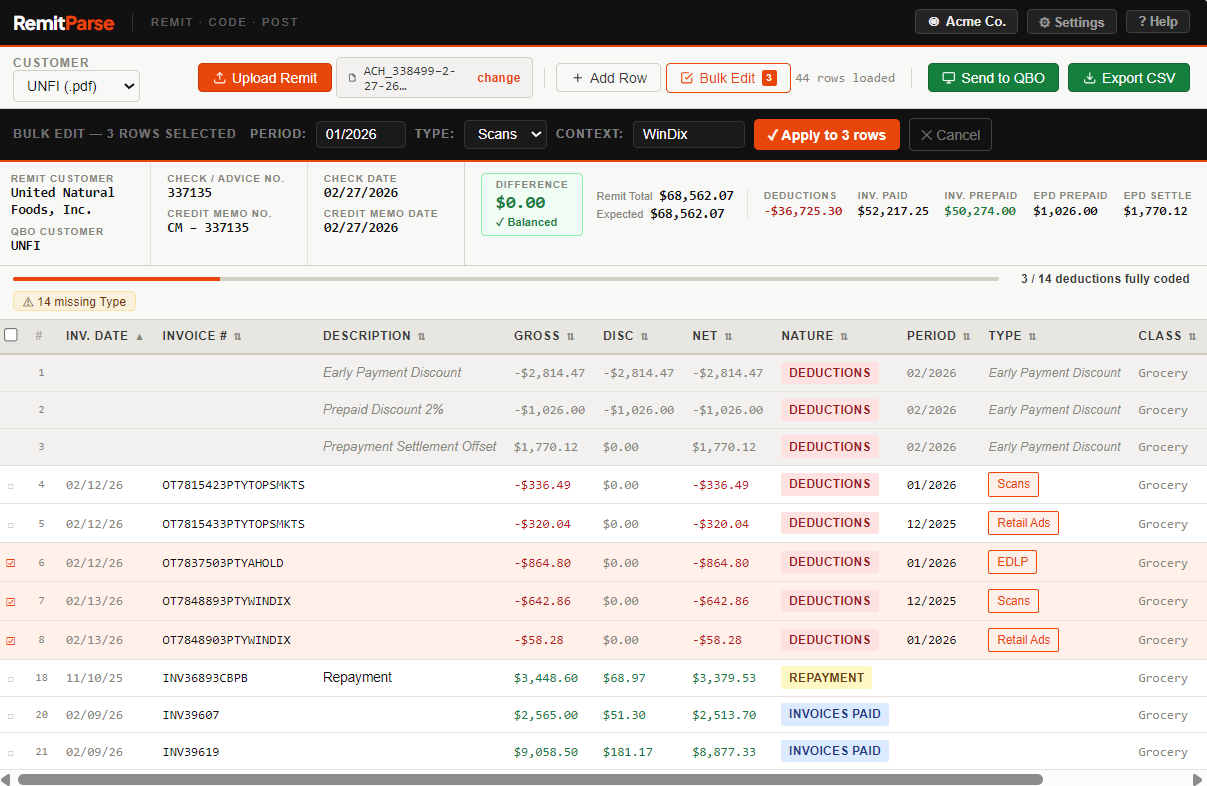
For deductions that come with one of those individual backup documents — a credit note, a chargeback notice, a shortage claim form, a compliance fee breakdown — that's a separate parsing problem on top of the remittance itself. RemitParse's AI Document Coding reads those documents directly, one deduction at a time, and suggests the coding automatically, rather than leaving that step manual even after the remittance is parsed.
From Parsed Line Items to a Posted Payment
Extracting the data is only half the job — the line items still have to turn into something QuickBooks recognizes. Once a remittance is parsed:
- Each deduction line item gets coded to the right GL account, based on its type and your own coding history.
- The invoice numbers referenced on the remittance get matched to your open invoices in QuickBooks Online.
- A credit memo is created for each deduction, tied back to the matched invoice.
- The payment is applied against those invoices, net of the credit memos, closing them out — no manual invoice application, no re-typing amounts.
That's the difference between a parser and a full cash application workflow: parsing gets you clean data, but matching invoices, creating credit memos, and applying the payment is what actually clears your AR. For the full walkthrough of that process on a real remittance, see UNFI Cash Application with RemitParse; for the underlying concept, see CPG Cash Application Explained.
What to Look for in a Parsing Tool
| Capability | Why it matters |
|---|---|
| Handles scanned/OCR PDFs | Several major distributors don't send digital-native files |
| Covers multiple distributor formats | Most CPG brands sell through more than one account |
| Classifies deduction types | Raw line items still need to map to GL accounts |
| Matches invoices and posts payments | Extraction alone still leaves manual invoice application |
| Reads individual backup documents (credit notes, chargeback notices) | Some deductions need more than the remittance line to code correctly |
Where RemitParse Fits
RemitParse parses remittance advice from UNFI, KeHE, Kroger, Walmart, Costco, Target, and other major CPG distributors and retailers — extracting every deduction line item, coding it, matching invoices in QuickBooks Online, and posting the payment and credit memos directly.
If you have a UNFI remittance on hand right now, you can see this in action immediately: try the free UNFI remittance parser — no account required, results in about 15 seconds. For KeHE, Kroger, Walmart, Costco, Target, and the full invoice-matching and posting workflow, that's available inside a RemitParse account.
Related Guides
These posts go deeper on specific distributors and workflows:
- UNFI Deduction Codes Explained — what every prefix on your UNFI remittance actually means
- KeHE Deductions Explained — decoding remittance advice across KeHE's 50+ retailer network
- Kroger Remittance Reconciliation — how to decode Supplier Connect payments and the EFT/netting structure
- UNFI Cash Application with RemitParse — the full walkthrough from PDF to posted QuickBooks payment
- CPG Cash Application Explained — what cash application is and why it's hard in CPG
- AI Document Coding — how RemitParse reads deduction backup documents and suggests coding automatically
- The CPG Deduction Translation Guide — how sales, accounting, and finance describe the same deductions differently
FAQ
A tool that reads a remittance advice PDF and extracts each deduction line item — invoice numbers, amounts, deduction codes, and descriptions — into a structured table instead of a document you'd otherwise have to read and transcribe by hand.
Most distributor remittances are scanned images requiring OCR, or formatted PDFs where rows don't map cleanly to a spreadsheet. A single remittance can bundle 50–200+ line items across different transaction types, which is why manual processing typically takes hours per cycle.
Each deduction line gets coded to the right account, the invoices referenced on the remittance get matched to open invoices in QuickBooks, and a credit memo is created for each deduction. The payment is then applied against the matched invoices net of those credit memos, closing them out without manual entry.
A capable parser should handle PDF remittances, including scanned or OCR-heavy formats, as well as Excel and CSV exports where distributors provide them. Format handling varies by distributor.
Yes. When a deduction line item on your remittance is backed up by an individual document — a credit note, chargeback notice, or deduction invoice — RemitParse's AI Document Coding reads that document directly and suggests the coding. This is different from parsing the remittance itself, which bundles many deductions into one file; a credit note typically backs up just one.
RemitParse parses remittance advice from UNFI, KeHE, Kroger, Walmart, Costco, Target, and other major CPG distributors and retailers, extracting and coding every deduction line item, matching invoices in QuickBooks Online, and posting the payment and credit memos directly.
See it work on a real remittance
Try the free UNFI parser with no account required, or start a trial for KeHE, Kroger, Walmart, Costco, Target, and full invoice matching and posting.