If you sell to United Natural Foods, Inc. (UNFI), deductions are not occasional. They're operational.
Every remittance cycle includes pricing adjustments, promotional allowances, compliance fees, and discounts. The challenge isn't that deductions exist. It's that they arrive in PDF form, with codes that require interpretation, and they rarely match your internal tracking cleanly.
Most finance teams spend 4–10 hours per remittance cycle:
- Downloading PDFs
- Extracting line items
- Interpreting deduction codes
- Matching invoices
- Entering adjustments into QuickBooks Online
- Saving backup documentation
That time adds up quickly.
Enterprise platforms like Confido automate the full deduction lifecycle — trade forecasting, dispute management, ERP integration. That's useful for larger brands with complex trade programs. But most emerging and mid-size CPG operators don't need a full cash-ops platform. They need clean, structured, accounting-ready deduction data. Fast.
TL;DR
- UNFI deduction codes are alphanumeric prefixes on your remittance that identify why a line was deducted — MCB, OIA, CBPB, INV, and others each mean something different.
- The code alone doesn't tell you how to book it — an MCB is contra revenue, a compliance fee is an operating expense, a CBPB is a repayment invoice.
- The reference table below maps every major UNFI deduction code to its plain-English meaning and QuickBooks accounting treatment.
- RemitParse reads UNFI remittance PDFs and pre-classifies every line by code type, so you review exceptions instead of every row.
Need to parse a UNFI remittance right now?
Drop your UNFI PDF into our free parser tool and view your extracted invoice and deduction grid instantly—no account required.
Try Free UNFI Parser Tool →What Are UNFI Deduction Codes?
UNFI maintains an official Supplier Deduction Key inside its supplier portal. It contains hundreds of codes that explain why money was withheld from invoice payments. While the file is extensive, most deductions fall into repeatable categories. Understanding those categories is what actually matters for reconciliation.
1. Sales & Program Allowances
These typically relate to trade spend and promotional agreements. Examples include sales velocity report fees, promotional allowances, and program-based deductions.
Accounting treatment: Trade Spend (contra revenue)
These deductions are expected — but often hit in aggregate and require manual matching to internal promotion calendars.
2. Pricing or Quantity Discrepancies
When invoice pricing or quantities don't match receiving data. Common formats include invoice number with suffix or Invoice#-### style references.
Accounting treatment: Revenue adjustment or pricing dispute
These require validation against purchase orders and shipping documentation.
3. Spoilage, Damages & Recalls
Inventory removed due to expiration, warehouse damage, or recall activity. May reference disposal, quality claims, or recall handling.
Accounting treatment: Spoilage expense or quality claims
These can spike after heavy promotional periods or over-ordering events.
4. Compliance & Operational Charges
Triggered when shipments fail to meet distributor requirements. Common drivers include barcode non-compliance, labeling issues, and routing guide violations.
Accounting treatment: Compliance fees or logistics expense
These deductions are often preventable but operationally tedious to track.
5. Retailer Pass-Through Charges
UNFI may deduct amounts paid to retailers on your behalf. Often formatted as invoice + retailer code or third-party billbacks.
Accounting treatment: Retail support or trade spend
These require alignment with promotional agreements to validate.
6. Early Payment Discounts
Sometimes listed in a separate "Discount" column. Even when payment timing is tight, discounts may still be applied and must be reconciled.
Accounting treatment: Early payment discount (contra revenue)
What a UNFI Remittance Looks Like
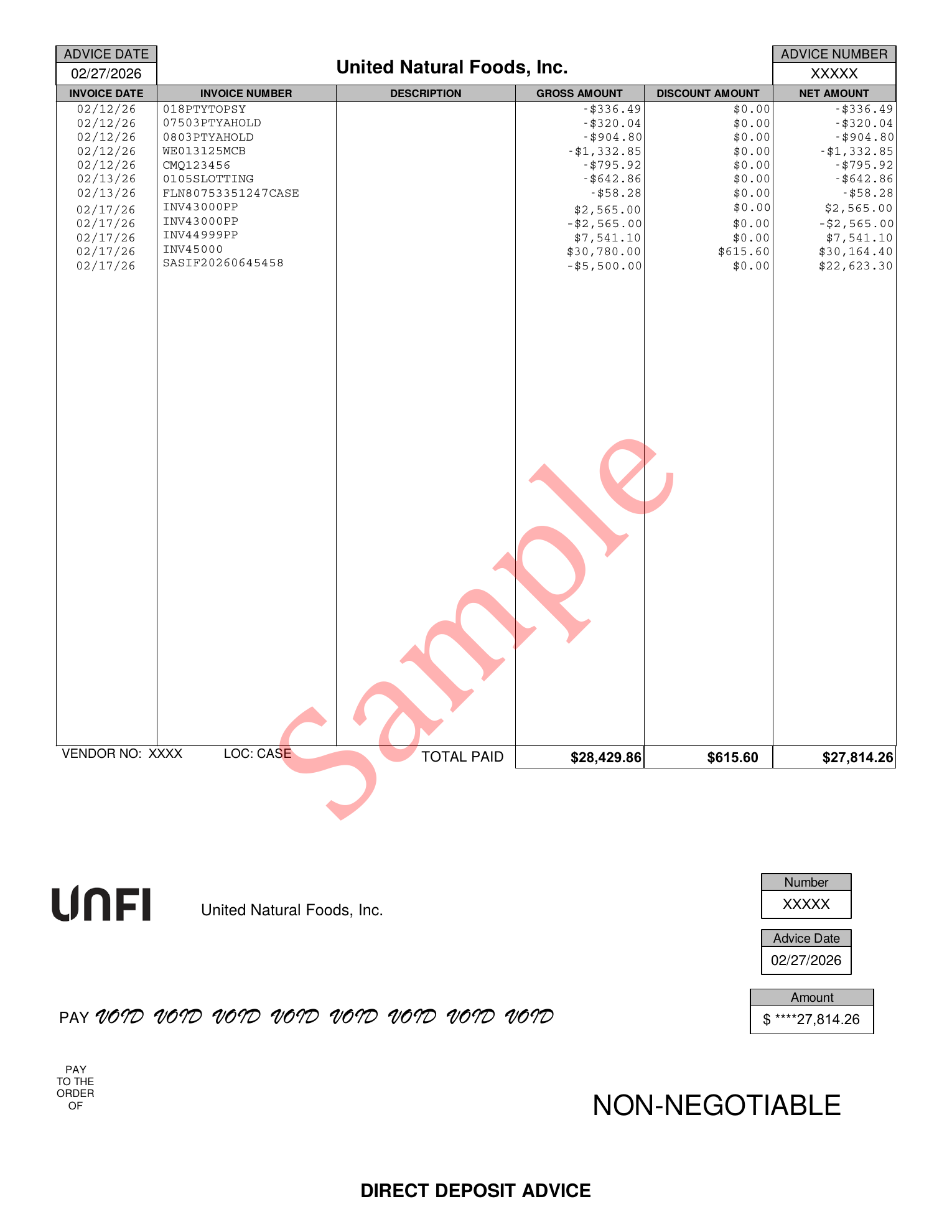
This is a real UNFI Direct Deposit Advice — the document your finance team receives each payment cycle. Every line item below requires interpretation before it can be entered into QuickBooks.
Why UNFI Deductions Create Operational Drag
The issue isn't understanding trade promotions. It's execution.
A typical manual workflow looks like this: download the remittance PDF, copy line items into Excel, interpret deduction codes, assign GL accounts, re-enter data into accounting software, store backup documentation, and repeat next cycle.
The friction points are consistent: codes require interpretation, PDFs aren't structured data, backup lives in multiple systems, manual entry introduces errors, and month-end close slows down. This is where most brands lose time.
Enterprise Automation vs. Practical Automation
Enterprise platforms focus on full deduction lifecycle management, trade promotion integration, ERP synchronization, and dispute workflow automation. That's appropriate for brands running large trade budgets across multiple national retailers.
RemitParse focuses on the bottleneck most operators actually feel: remittance extraction and accounting entry. Not forecasting. Not enterprise ERP overhaul. Just removing the repetitive work.
Test Your Remittance PDF Live
Run your UNFI Direct Deposit Advice through our web parser. OCR reads every line, builds a clean itemized grid, and prepares a CSV export.
The RemitParse Workflow
Step 1: Upload UNFI Remittance PDF
RemitParse extracts invoice numbers, payment amounts, deduction codes, and deduction amounts. It acts as a remittance advice parser built specifically for UNFI's format — no copying and pasting, no manual column mapping.
Step 2: Structured Line Items
Data is normalized, categorized, and matched to invoices. Exceptions are flagged when confidence is low. You review exceptions, not every line.
Step 3: Accounting-Ready Export
Download a structured CSV formatted for QuickBooks Online, internal accounting review, or journal entry upload. No spreadsheet rebuilding. No manual rekeying.
Where RemitParse Fits
RemitParse makes sense if you sell primarily through UNFI or similar distributors, use QuickBooks Online, spend several hours per remittance cycle on cleanup, and don't need enterprise trade management software. It removes clerical workload without introducing system complexity.
The Real Cost of Manual Remittance Processing
Assume a finance manager salary of $85,000 — roughly $45/hour fully loaded. At 6 hours per cycle and 2 cycles per month, that's 144 hours annually. $6,480 per year spent parsing remittances. That excludes dispute management and reporting.
This isn't about replacing staff. It's about redeploying time to higher-value analysis.
FAQ: UNFI Deduction Codes & Automation
What is the UNFI Supplier Deduction Key?
It's an official file within the UNFI supplier portal listing deduction codes and descriptions used in remittance statements.
How do UNFI deductions affect accounting?
They reduce invoice payments and must be categorized properly — typically as contra revenue, trade spend, compliance fees, or expense adjustments.
Why are UNFI remittances difficult to process?
They are distributed as PDFs with embedded deduction codes that require interpretation and manual structuring before accounting entry.
Can UNFI remittance processing be automated?
Yes. Remittance PDFs can be extracted, normalized, categorized, and exported into accounting-ready formats using automation tools like RemitParse.
Do small CPG brands need enterprise TPM software?
Not always. Many brands primarily need structured remittance extraction and clean accounting exports rather than full trade lifecycle platforms.
Related Guides
If you found this useful, these guides cover related ground:
- CPG Cash Application Explained — what cash application is, why it's hard in CPG, and how brands automate it
- UNFI Cash Application with RemitParse — Full Walkthrough — parsing, matching, and posting a UNFI remittance in one session
- How to Process UNFI Remittance Advice in QuickBooks — a step-by-step walkthrough of the full coding workflow
- KeHE Deductions Explained — KeHE billback types, remittance sources, and how to code them in QuickBooks
- The CPG Deduction Translation Guide — how sales, accounting, and finance describe the same deductions differently
- Kroger Remittance Reconciliation — how to decode Supplier Connect payments and the EFT/netting structure
- CPG Deduction Software: TPM vs. Cash Application — do you have a planning problem or an accounting problem?
- RemitParse QuickBooks Setup Guide — connect QBO, configure profiles, and enable Auto-Coding
Try the UNFI Remittance Parser
Upload your PDF file to extract line items instantly, or start a trial to automate direct QuickBooks posting.