TL;DR: Kroger settles supplier invoices through two parallel systems — EFT checks and netting settlements — that must be reconciled across three Supplier Connect exports. Understanding deduction codes (092-A, SH, ORAD, KOMPASS, PRGX post-audit) is the prerequisite to getting this into QuickBooks correctly. RemitParse's Kroger Reconstruct Remittance feature automates the three-file merge and generates balanced remittance files ready for QBO cash application.
In this guide
- From Lavante to Supplier Connect — what changed
- Two payment systems: EFT checks vs. netting settlements
- Three export files, none self-contained
- The linking problem: traversing the full chain
- RemitParse Kroger Reconstruct Remittance
- Kroger deduction codes reference (092-A, SH, ORAD, and more)
- From reconciliation to QuickBooks cash application
From Lavante to Supplier Connect — what changed
In October 2025, Kroger completed its migration from Lavante to Supplier Connect, the updated remittance and correspondence management platform built on the PRGX system. All historical Lavante data was carried over. The underlying payment structure — EFT checks, netting settlements, three-file exports — remains identical. What changed is how you access it.
Supplier Connect is accessed through Partner Pass (partnerpass.krogerapps.com), Kroger's single sign-on portal. Multi-factor authentication via Okta Verify is required — download the Okta app on a mobile device before attempting login. For access issues, support runs through Partner Pass, not a direct Supplier Connect helpdesk.
If you're searching for "Kroger Lavante": Lavante was decommissioned in October 2025. Everything now lives in Supplier Connect. The reconciliation process described in this guide — EFT checks, netting settlements, three export files — works identically in both platforms. Navigation changed; the data structure did not.
The Transactions page in Supplier Connect is where you'll spend most of your time. It has three views: Payments, Invoices, and Promotions — each corresponding roughly to one of the three export files needed for full reconciliation. Disputes are submitted from the Invoices view. You have 180 days from the deduction date to file a claim.
Two payment systems: EFT checks vs. netting settlements
When Kroger pays a supplier invoice, they use two parallel systems simultaneously.
The first is an EFT check — actual cash wired to your bank. Supplier Connect will show you the check number and the invoices it covers, but not the deduction detail. You can see you were paid less than the invoice amount, but the gap between your net invoice and the check amount is a plug until you link in the promotional charges that were netted against it.
The second is a netting settlement — a non-cash transaction processed entirely inside Kroger's AP/AR system. This is where all the deductions live: KOMPASS promotional scan allowances, coupon fees, PRGX post-audit chargebacks, freight billings, slotting fees, ORAD compliance fines. The settlement zeros out against the invoice, and what's left after netting becomes the EFT amount.
To understand what's actually in a check, you have to find the netting settlements tied to those invoices — and those live in a completely separate section of the portal. This is the core difficulty of Kroger reconciliation and the reason it takes so much longer than processing a UNFI or KeHE remittance.
Three export files, none self-contained
Fully reconciling a single Kroger payment period requires three separate exports from Supplier Connect. None tells the whole story on its own.
The Payments export is the spine. One row per invoice per payment event — it tells you whether each row is a cash payment, an invoice consumed by netting, or a deduction charge line. This is where you find the settlement numbers that link everything together.
The Invoices export gives you the gross, discount, and net amounts for each supplier invoice. The Payments export references invoice numbers but carries no dollar amounts — you need this file to know what each invoice was worth before deductions.
The Promo Payments export provides human-readable descriptions for the deduction charge lines. Without it, your charges are just opaque reference numbers. The Promo export adds division, promotional week, KOMPASS campaign descriptions, and internal comments — the context you need to understand and dispute a charge.
The linking problem: traversing the full chain
Even with all three files, linking them together correctly is not straightforward.
A single netting settlement can cover more than one invoice. When that happens, one invoice may have an EFT row while another may not — it was fully consumed by the netting. Miss that relationship and an invoice disappears from your reconciliation entirely. Your AR aging is wrong and you don't know it.
An invoice can also have more than one netting settlement applied to it, each with its own set of charge lines. Miss one settlement and your deduction totals don't foot.
In practice, reconciling a Kroger payment period manually means opening three files, writing a series of lookups across them, handling edge cases by hand, decoding charge types against a separate reference document, and building a summary that proves the math closes. For a period with a handful of EFT checks, this takes several hours. For a larger period, most of a day.
RemitParse Kroger Reconstruct Remittance
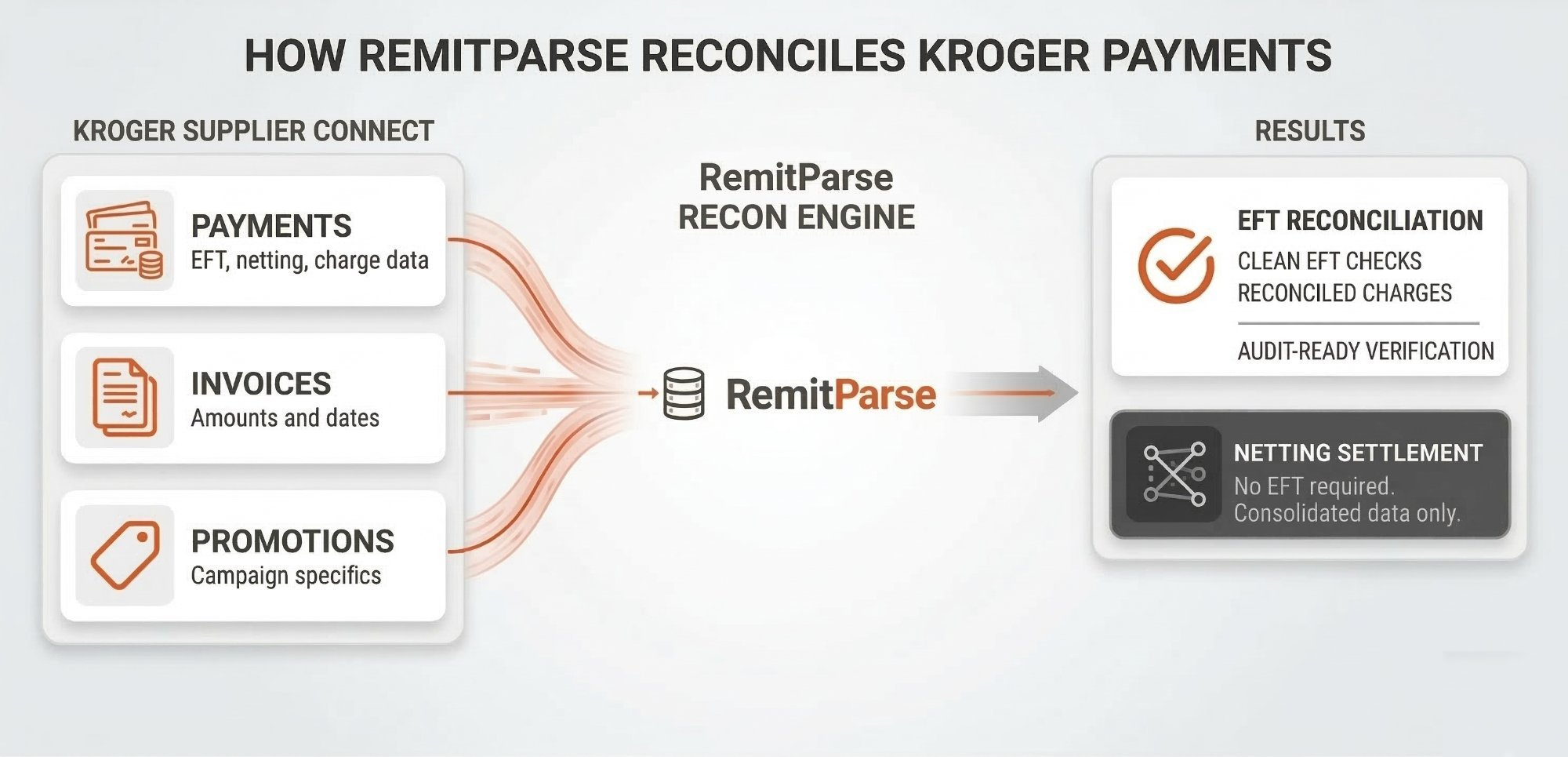
Because Kroger doesn't produce a single, self-contained remittance document, we built a tool that does it for you. The Kroger Reconstruct Remittance feature in RemitParse reads all three Supplier Connect exports and produces individual, formatted remittance files — one per EFT check, one per fully-settled netting — automatically.
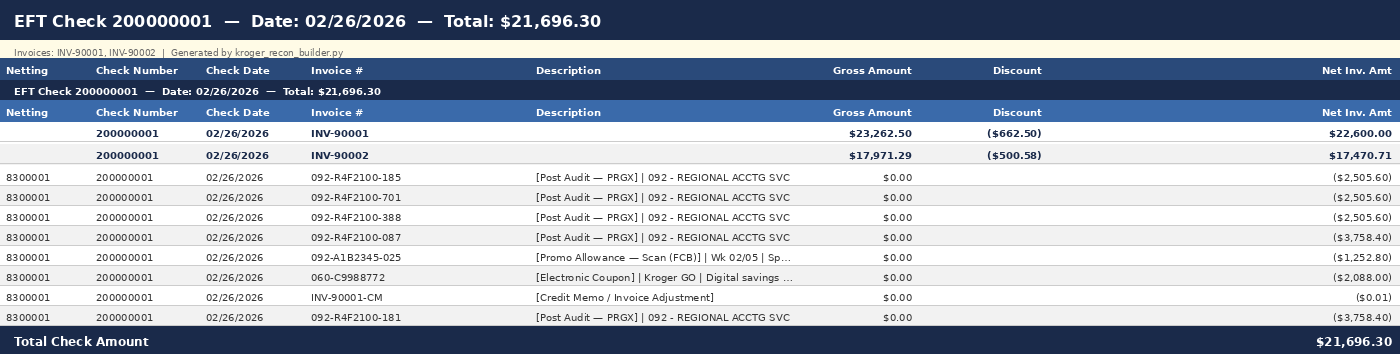
Each generated file lists the invoices at the top, followed by all deduction lines with decoded charge type labels and KOMPASS campaign descriptions from the Promo export. The math is verified against the actual check total. Edge cases are handled: shared settlements, multi-settlement invoices, in-process settlements not yet ready to close.
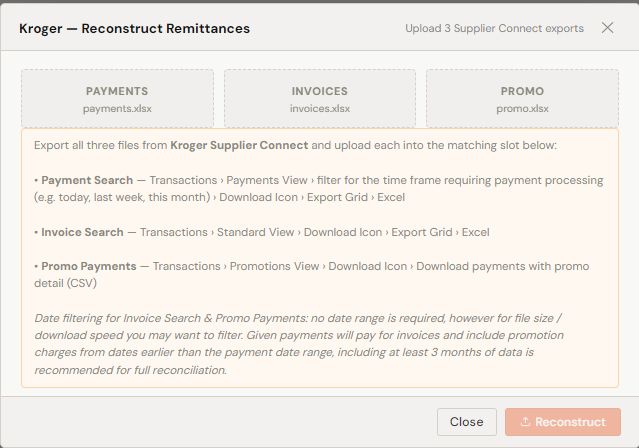
The workflow starts by uploading all three Supplier Connect exports. Each file slots into its designated role — Payments, Invoices, and Promo — and RemitParse handles the linking logic from there:
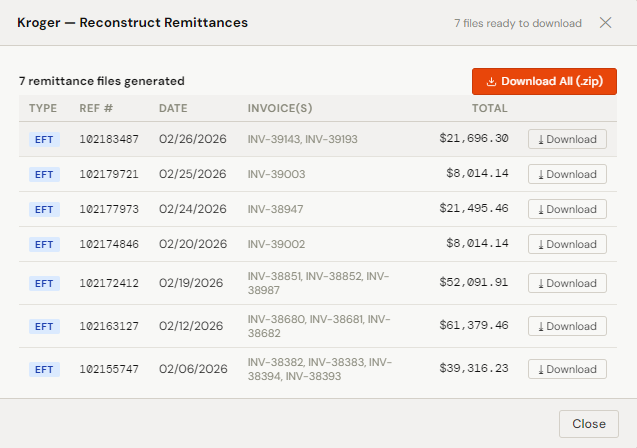
RemitParse batches the entire payment period at once rather than processing each EFT check individually. A full month of Kroger activity — multiple checks, dozens of invoices, hundreds of KOMPASS and PRGX charge lines — is reconciled in a single pass and delivered as individual downloadable remittance files:
The result is a clean, consistent, auditable remittance for every payment — produced in seconds. Here's what a generated file looks like:
Kroger deduction codes reference
Once you've linked the right charge lines to the right payment, you still have to figure out what each charge actually is. Kroger uses invoice number prefixes and reason codes to identify charge types. Here are the codes that appear most often on Supplier Connect remittances, along with what they mean and how to respond:
| Code / Prefix | Deduction Type | Description & System Source |
|---|---|---|
| 092 - A | Promotional Allowance | Scans, KATS billings, or KOMPASS deductions for trade spend. The most common Kroger deduction for CPG brands — scan allowances, display fees, and coupon reimbursements processed through Kroger's KOMPASS promotional management system. Detail appears in the Promo Payments export. |
| SH / Code 4 | Shortage | Value of goods not delivered vs. the original Purchase Order. Kroger charges a shortage when their receiving records show fewer units than the PO quantity. Dispute with signed Proof of Delivery and Bill of Lading. Keep timestamped shipping documentation — these are the most frequently disputed Kroger deductions. |
| EV / Code 5 | EDI Non-Compliance | Issues with required EDI documents (810 invoice, 856 advance ship notice). Typically a flat $250 fee or 1% of the invoice amount. Kroger requires all invoices via EDI — missing or malformed documents trigger this automatically. Monitor EDI acknowledgments to catch these before they become deductions. |
| ddd - R / Z | PRGX Post-Audit | Deductions from external audits conducted by PRGX, Kroger's third-party audit firm. Post-audit claims can appear months or years after the original transaction. These often require escalation to a Kroger buyer and supporting contract documentation to dispute. Keep invoice copies, BOLs, and PODs on file longer than you think you'll need them. |
| OI / Code 2 | Off-Invoice | Deductions for promotional allowances not automatically captured during billing — typically manual corrections for trades, co-ops, salvages, or allowances not set up in Kroger's system at time of invoice. Dispute by providing a copy of the original invoice and the relevant allowance contract. |
| ddd - V | Reclamation | Charges for unsalable, returned, or recalled products handled by third-party reclamation centers. Dispute contact: kroger.reclaim@prgx.com. For Fred Meyer reclamation specifically: Stephanie.Green@fredmeyer.com. |
| ORAD / Code G | Late Shipment | "Original Requested Arrival Date" fines for failing to meet Kroger's delivery windows. These are compliance chargebacks — not promotional deductions — and follow their own dispute pathway in Supplier Connect. Keep timestamped proof of tender and carrier pickup records to support any ORAD disputes. |
| S / 092-S | Slotting Fees | One-time payments for product placement on store shelves or in warehouses. Slotting fees should match your buyer agreement. If the amount doesn't align with your contract, dispute with a copy of the signed slotting agreement and the relevant buyer approval. |
A few notes on working with these codes in practice:
- 180-day dispute window is firm. All Kroger deductions must be disputed within 180 days of the charge date. Build a process to review new deductions at least monthly — letting PRGX post-audits or shortage claims age past the window is expensive.
- KOMPASS (092-A) codes dominate volume. For most CPG brands running active promotional programs, 092-A deductions will account for the majority of Kroger remittance lines. Reconciling these against your trade spend plan is the most important thing you can do to understand true Kroger profitability.
- PRGX post-audits (ddd-R/Z) require historical documentation. Because they can appear years after the original transaction, your team may no longer have the supporting documents. Retain invoice copies, BOLs, PODs, and contract copies for a minimum of three years — longer if your Kroger volume is significant.
From reconciliation to QuickBooks cash application
A reconciled remittance file is the starting point, not the finish line. The output of the Kroger Reconstruct process feeds directly into RemitParse's standard workflow for posting to QuickBooks Online.
Each generated remittance file maps cleanly to a QBO cash application:
Class and Location coding: If your QuickBooks company uses Class or Location tracking, RemitParse applies them to every Kroger deduction line on the credit memo — based on the defaults in your Kroger customer profile. This is how you get Kroger trade spend broken out by channel or region without a separate spreadsheet or manual journal entry.
For Kroger suppliers, this closes the loop between receiving an ACH deposit and having accurate books — without spreadsheet lookups, without manual credit memo entry, and without the risk of a KOMPASS deduction landing in the wrong GL account because you couldn't decode the charge code fast enough.
Related guides
If you work with other distributors or want more context on deduction accounting:
- CPG Cash Application Explained — what cash application is, why it's hard in CPG, and how brands automate it
- UNFI Cash Application with RemitParse — Full Walkthrough
- UNFI Deduction Codes Explained — what every prefix on your UNFI remittance actually means
- How to Process UNFI Remittance Advice in QuickBooks — step-by-step coding and reconciliation workflow
- KeHE Deductions Explained — Supplier Guide to Remittance Processing
- The CPG Deduction Translation Guide: Sales vs. Accounting Language
- RemitParse QuickBooks Setup Guide — connect QBO, configure profiles, and enable Auto-Coding
- CPG Deduction Software: TPM vs. Cash Application — do you have a planning problem or an accounting problem?